
ETL: source, transforms, target and increments
Applies to 1.0.0. Tasks → New/Edit → plugin ETL.
Before you start
Use ADMIN to create, configure and save tasks. ADMIN or OPERATOR can execute published definitions; ADMIN reads detailed logs and input/output variables. Resources must be enabled and reachable from the execution node. See tasks for common timeout, retry and version settings, and the permission matrix.
Find the settings you need
Source / Type and resource · Source / Database · Source / Files and formats · Source / Messaging · Target / Database writes · Target / File output · Database incremental extraction · Incremental file processing · Message ingestion · Execution limits · Mapping · Retries
Field reference
“Default” means the initial value of a new 1.0.0 form. An empty value means the field has not been filled in; required fields still need a value. Visibility follows the selected branch; conditional requirements apply only to that branch. Transformation/validation examples illustrate input and are not runtime fallbacks.
Source / Type and resource
| Field | Required | Default | Visible when | Scope |
|---|---|---|---|---|
| Source type | Select | DATABASE | Always | source |
| Resource | Conditionally required | Empty | Always | source |
- Source type: Choose DATABASE, FILE, KAFKA or RABBITMQ; this determines the remaining source fields.
- Resource: Reference a configured resource matching the source type; connection and authentication come from that resource.
Source / Database
| Field | Required | Default | Visible when | Scope |
|---|---|---|---|---|
| Query SQL | Conditionally required | Empty | Database source or SQL-based file reads | source |
| Fetch size | Has a default | 2000 | Database source | source |
| Query parameters (JSON) | Has a default | {} | Database source or SQL-based file reads | source |
| Setup SQL array (JSON) | Has a default | [] | Database source | source |
- Query SQL: Define a database query or a query over staged file data; use named bindings for value parameters.
- Fetch size: Range 1–100000
- Query parameters (JSON): Provide JSON values for named SQL parameters; a standalone variable placeholder can preserve its value type.
- Setup SQL array (JSON): Run setup SQL statements in order before reading the source database.
Source / Files and formats
| Field | Required | Default | Visible when | Scope |
|---|---|---|---|---|
| File path | Conditionally required | Empty | File source | source |
| File format | Select | CSV | File source | source |
| Read mode | Select | DIRECT | File source | source |
| Character encoding | Conditionally required | UTF-8 | File source | source |
| Delimiter | Has a default | , | CSV/TXT | source |
| Quote | Has a default | " | CSV/TXT | source |
| Escape | Has a default | " | CSV/TXT | source |
| Header row | Has a default | true | CSV/TXT/EXCEL | source |
| Skip lines | Has a default | 0 | CSV/TXT | source |
| Header row index | Has a default | 0 | EXCEL | source |
| Start row index | Optional | Empty | EXCEL | source |
| Sheet name | Optional | Empty | EXCEL single worksheet | source |
| Sheet index | Optional | Empty | EXCEL single worksheet | source |
| Regex read mode | Select | SINGLE_LINE | REGEX | source |
| Content pattern | Conditionally required | Empty | REGEX | source |
| Block start pattern | Optional | Empty | REGEX + BLOCK | source |
| Block end pattern | Optional | Empty | REGEX + BLOCK | source |
| Max lines per block | Has a default | 10000 | REGEX | source |
| Max characters per block | Has a default | 4194304 | REGEX | source |
| Regex fields (JSON) | Required for REGEX, with at least one item | [] | REGEX | source |
| Staging table | Has a default | SOURCE_DATA | SQL-based file reads | source |
| Staging columns | Optional | Empty | SQL-based file reads | source |
| Multiple sheets (JSON) | Has a default | [] | EXCEL with SQL reads and multiple worksheets | source |
- File path: Specify the read path within the file resource scope.
- File format: Choose the file format, which determines available read modes.
- Read mode: Read file records directly or stage them before running SQL.
- Character encoding: Specify the character set for decoding text files.
- Delimiter: Specify the CSV/TXT field delimiter.
- Quote: Specify the quote character for fields containing delimiters or other special content.
- Escape: Specify the escape character for special content inside quoted fields.
- Header row: Choose whether field names come from a header row.
- Skip lines: Range 0–2147483647
- Header row index: Range 0–2147483647
- Start row index: Range 0–2147483647
- Sheet name: Select one Excel worksheet by name.
- Sheet index: Range 0–2147483647
- Regex read mode: Choose single-line matching or block-based matching.
- Content pattern: Extract capture groups from a line or block of text.
- Block start pattern: Identify the beginning of a text block to parse.
- Block end pattern: Identify the end of a text block to parse.
- Max lines per block: Range 1–1000000
- Max characters per block: Range 1–67108864
- Regex fields (JSON): Map regex capture groups to record fields, with optional defaults for missing matches.
- Staging table: Name the staging table used for SQL-based file reads.
- Staging columns: Explicitly name staging columns; otherwise use names from file parsing.
- Multiple sheets (JSON): Configure worksheet selection, headers and staging tables for multiple Excel worksheets.
Source / Messaging
| Field | Required | Default | Visible when | Scope |
|---|---|---|---|---|
| Topic | Conditionally required | Empty | Kafka source | source |
| Consumer group | Conditionally required | Empty | Kafka source | source |
| Queue | Conditionally required | Empty | RabbitMQ source | source |
| Initial position | Select | EARLIEST | Kafka source | source |
| Prefetch (messages) | Has a default | 100 | RabbitMQ source | source |
- Topic: Kafka topic from which messages are consumed.
- Consumer group: Kafka consumer group used to retain consumption progress.
- Queue: RabbitMQ queue from which messages are consumed.
- Initial position: Choose the initial position only when the consumer group has no committed offset.
- Prefetch (messages): Range 1–1000
Target / Database writes
| Field | Required | Default | Visible when | Scope |
|---|---|---|---|---|
| Target type | Select | DATABASE | Always; message sources require DATABASE | target |
| Resource | Conditionally required | Empty | Always | target |
| Schema (optional) | Optional | Empty | DATABASE | target |
| Target table | Conditionally required | Empty | DATABASE | target |
| Load mode | Select | UPSERT | DATABASE; message sources allow only UPSERT/INSERT_ONLY | target |
| Logical keys | Required for UPSERT/INSERT_ONLY/UPDATE_ONLY | Empty | DATABASE | target |
| Field mapping mode | Select | AUTO | Always | target |
| Excluded source fields (optional) | Optional | Empty | AUTO mapping | target |
| Transaction scope | Select | RUN | Non-message source with DATABASE target; message sources require BATCH | target |
| Null policy | Select | KEEP_TARGET | DATABASE | target |
| Column null policies (JSON) | Has a default | {} | DATABASE | target |
| Record protection (JSON) | Has a default | null | DATABASE | target |
| SCD2 configuration (JSON) | Has a default | null | DATABASE + SCD2 | target |
| Setup SQL array (JSON) | Has a default | [] | Non-message source with DATABASE target | target |
| Cleanup SQL array (JSON) | Has a default | [] | Non-message source with DATABASE target | target |
- Target type: Choose a database or file target; message sources require a database target.
- Resource: Reference the target database or file resource.
- Schema (optional): Specify the schema containing the target table.
- Target table: Specify the target table to write.
- Load mode: Choose append, insert, update, upsert or SCD2 write semantics.
- Logical keys: List target column names used to identify target records.
- Field mapping mode: Choose automatic same-name mapping or manual field mapping.
- Excluded source fields (optional): Exclude source fields from automatic mapping.
- Transaction scope: Choose transaction commits for the whole run or for each write batch.
- Null policy: Set the default policy for preserving or overwriting target values when the source is null.
- Column null policies (JSON): Override the default null policy for individual target columns.
- Record protection (JSON): Protect target records based on a configured column and values.
- SCD2 configuration (JSON): Configure business keys, change comparison and historical validity columns.
- Setup SQL array (JSON): Run setup SQL before target writes; message and incremental-file modes impose additional restrictions.
- Cleanup SQL array (JSON): Run cleanup SQL after target writes; message and incremental-file modes impose additional restrictions.
Target / File output
| Field | Required | Default | Visible when | Scope |
|---|---|---|---|---|
| File path | Conditionally required | Empty | FILE | target |
| Character encoding | Conditionally required | UTF-8 | FILE | target |
| Delimiter | Has a default | , | FILE | target |
| Quote | Has a default | " | FILE | target |
| Header row | Has a default | true | FILE | target |
| Existing file policy | Select | FAIL | FILE | target |
| Empty output policy | Select | CREATE_WITH_HEADER | FILE | target |
- File path: Specify the output path within the target file resource scope.
- Character encoding: Specify the character set of the output text file.
- Delimiter: Specify the output field delimiter.
- Quote: Specify the quote character for output fields.
- Header row: Choose whether the output file includes a header row.
- Existing file policy: Choose failure, overwrite or skip when the target file already exists.
- Empty output policy: Choose a header-only file, an empty file or no file when there is no data.
Database incremental extraction
| Field | Required | Default | Visible when | Scope |
|---|---|---|---|---|
| Enable incremental extraction | Has a default | false | Non-message source | incremental |
| Checkpoint key | Conditionally required | etl-v1 | Incremental extraction enabled | incremental |
| Marker type | Select | LONG | Incremental extraction enabled | incremental |
| Initial marker | Conditionally required | 0 | Incremental extraction enabled | incremental |
| Marker field | Conditionally required | Empty | Database incremental extraction | incremental |
| Upper bound SQL | Conditionally required | Empty | Database incremental extraction | incremental |
| Tie breaker fields | Optional | Empty | Database incremental extraction | incremental |
| Initial tie values (JSON array) | Has a default | [] | Database incremental extraction | incremental |
| Advance past invalid records | Has a default | false | Database incremental extraction | incremental |
- Enable incremental extraction: Enable database-watermark or file-marker incremental processing; not used for message sources.
- Checkpoint key: Identify the incremental checkpoint to retain across executions.
- Marker type: Choose the type used to compare database watermarks or file markers.
- Initial marker: Starting watermark used when no checkpoint exists.
- Marker field: Source result field used to advance the database checkpoint.
- Upper bound SQL: Query a stable upper watermark before this read.
- Tie breaker fields: List stable tie-break fields, in order, for records sharing a watermark.
- Initial tie values (JSON array): Provide initial values corresponding to each tie-break field.
- Advance past invalid records: Allow checkpoints to advance past filtered invalid records, which may prevent automatic rereading.
Incremental file processing
| Field | Required | Default | Visible when | Scope |
|---|---|---|---|---|
| Marker location | Select | NAME | Incremental file processing | file |
| Match mode | Select | TEMPLATE | Incremental file processing | file |
| Match expression | Conditionally required | orders_{mark}_*.csv | Incremental file processing | file |
| Source marker format (optional) | Optional | Empty | Incremental file processing with DATE/TIMESTAMP | file |
| Parsing time zone | Has a default | UTC | Incremental file processing with DATE/TIMESTAMP | file |
| Selection mode | Select | STRICT | Incremental file processing | file |
| Lookback window | Conditionally required | 2 | Incremental file processing with LOOKBACK | file |
| Explicit lower bound | Conditionally required | Empty | Incremental file processing with LOWER_BOUND | file |
| Upper bound (optional) | Optional | Empty | Incremental file processing | file |
| Changed completed file policy | Select | FAIL | Incremental file processing | file |
| Scan subdirectories | Has a default | false | Incremental file processing | file |
| Max scan depth | Has a default | 8 | Incremental file processing | file |
| Max scanned entries | Has a default | 10000 | Incremental file processing | file |
| Max files per run | Has a default | 1000 | Incremental file processing | file |
| Total file limit (bytes) | Has a default | 1073741824 | Incremental file processing | file |
| Stable age (seconds) | Has a default | 60 | Incremental file processing | file |
| Ready suffix (optional) | Optional | Empty | Incremental file processing | file |
- Marker location: Extract incremental markers from file names or relative paths.
- Match mode: Choose template or regex matching for markers.
- Match expression: Match files and extract markers; templates use {mark}.
- Source marker format (optional): Specify the source format for date or timestamp markers.
- Parsing time zone: Time zone used to parse date-time markers.
- Selection mode: Choose strict advancement, a lookback window or an explicit lower bound.
- Lookback window: Configure the marker lookback range to reconsider.
- Explicit lower bound: Set an explicit lower bound for selecting file markers.
- Upper bound (optional): Optionally limit the upper file marker processed in this run.
- Changed completed file policy: Choose failure or reprocessing when a completed file changes.
- Scan subdirectories: Search files recursively within configured limits when enabled.
- Max scan depth: Range 0–32
- Max scanned entries: Range 1–100000
- Max files per run: Range 1–10000
- Total file limit (bytes): Range 1–107374182400
- Stable age (seconds): Range 0–604800
- Ready suffix (optional): Process only source files with the corresponding ready-marker file.
Message ingestion
| Field | Required | Default | Visible when | Scope |
|---|---|---|---|---|
| Messages per run | Has a default | 10000 | Kafka/RabbitMQ source | message |
| Intake window (seconds) | Has a default | 60 | Kafka/RabbitMQ source | message |
| Idle wait (seconds) | Has a default | 5 | Kafka/RabbitMQ source | message |
| Processing batch size | Has a default | 100 | Kafka/RabbitMQ source | message |
| Partial batch interval (ms) | Has a default | 1000 | Kafka/RabbitMQ source | message |
| Message limit (bytes) | Has a default | 1048576 | Kafka/RabbitMQ source | message |
| Expanded limit (bytes) | Has a default | 8388608 | Kafka/RabbitMQ source | message |
| Total payload limit (bytes) | Has a default | 1073741824 | Kafka/RabbitMQ source | message |
| Receive buffer limit (bytes) | Has a default | 33554432 | Kafka/RabbitMQ source | message |
| JSON depth limit | Has a default | 32 | Kafka/RabbitMQ source | message |
- Messages per run: Range 1–10000000
- Intake window (seconds): Range 1–3600
- Idle wait (seconds): Range 1–300
- Processing batch size: Range 1–1000
- Partial batch interval (ms): Range 100–10000
- Message limit (bytes): Range 1024–16777216
- Expanded limit (bytes): Range 1024–67108864
- Total payload limit (bytes): Range 1024–107374182400
- Receive buffer limit (bytes): Range 1024–268435456
- JSON depth limit: Range 1–100
Execution limits
| Field | Required | Default | Visible when | Scope |
|---|---|---|---|---|
| Read batch size | Has a default | 2000 | Advanced execution limits | execution |
| Write batch size | Has a default | 1000 | Advanced execution limits | execution |
| Query timeout (seconds) | Has a default | 300 | Advanced execution limits | execution |
| Max records | Has a default | 10000000 | Advanced execution limits | execution |
| Single file limit (bytes) | Has a default | 1073741824 | Advanced execution limits | execution |
| Max expanded text characters | Has a default | 268435456 | Advanced execution limits | execution |
| Max Excel cells | Has a default | 50000000 | Advanced execution limits | execution |
| Max staging cells | Has a default | 50000000 | Advanced execution limits | execution |
| Max fields per record | Has a default | 1000 | Advanced execution limits | execution |
| Max characters per field | Has a default | 1048576 | Advanced execution limits | execution |
| Max Excel sheets | Has a default | 100 | Advanced execution limits | execution |
- Read batch size: Range 1–100000
- Write batch size: Range 1–100000
- Query timeout (seconds): Range 1–86400
- Max records: Range 1–9223372036854775807
- Single file limit (bytes): Range 1–9223372036854775807
- Max expanded text characters: Range 1–9223372036854775807
- Max Excel cells: Range 1–9223372036854775807
- Max staging cells: Range 1–9223372036854775807
- Max fields per record: Range 1–10000
- Max characters per field: Range 1–16777216
- Max Excel sheets: Range 1–10000
Mapping
| Field | Required | Default | Visible when | Scope |
|---|---|---|---|---|
| Column mapping | At least one for MANUAL; optional for AUTO | Empty mapping | Always | Current task version |
- Column mapping: The configuration maps target columns to source fields; logical keys name target columns.
Retries
| Field | Required | Default | Visible when | Scope |
|---|---|---|---|---|
| Allow non-idempotent retries | Explicit consent required for APPEND with task retries | false | Non-message source | Current task version |
- Allow non-idempotent retries: Explicitly permit retries of non-idempotent operations such as append writes.
Transform / Field mapping
| Field | Required | Default | Visible when | Scope |
|---|---|---|---|---|
| Rule parameters (JSON) | Configure for the selected rule | See rule example below | Rule type FIELD_MAPPING | Current task version |
Rule input examples (adapt to your data):
| Field | Example |
|---|---|
| Rule parameters (JSON) | {"order_id":"id"} |
The example is prefilled when adding a rule, not a runtime default. Replace it with actual business fields.
Transform / Default values
| Field | Required | Default | Visible when | Scope |
|---|---|---|---|---|
| Rule parameters (JSON) | Configure for the selected rule | See rule example below | Rule type DEFAULT_VALUE | Current task version |
Rule input examples (adapt to your data):
| Field | Example |
|---|---|
| Rule parameters (JSON) | {"status":"NEW"} |
The example is prefilled when adding a rule; configure actual defaults for your fields.
Transform / Trim
| Field | Required | Default | Visible when | Scope |
|---|---|---|---|---|
| Fields | Required | See rule example below | Rule type TRIM | Current task version |
Rule input examples (adapt to your data):
| Field | Example |
|---|---|
| Fields | ["name"] |
Transform / Value replacement
| Field | Required | Default | Visible when | Scope |
|---|---|---|---|---|
| Field | Required | See rule example below | Rule type REPLACE | Current task version |
| Replacement pairs | Optional | See rule example below | Rule type REPLACE | Current task version |
Rule input examples (adapt to your data):
| Field | Example |
|---|---|
| Field | status |
| Replacement pairs | {"old":"new"} |
Transform / Date formatting
| Field | Required | Default | Visible when | Scope |
|---|---|---|---|---|
| Field | Required | See rule example below | Rule type DATE_FORMAT | Current task version |
| Source date format | Required | See rule example below | Rule type DATE_FORMAT | Current task version |
| Target date format | Required | See rule example below | Rule type DATE_FORMAT | Current task version |
Rule input examples (adapt to your data):
| Field | Example |
|---|---|
| Field | created_at |
| Source date format | yyyyMMdd |
| Target date format | yyyy-MM-dd |
Transform / Type conversion
| Field | Required | Default | Visible when | Scope |
|---|---|---|---|---|
| Field | Required | See rule example below | Rule type TYPE_CONVERT | Current task version |
| Target data type | Required | See rule example below | Rule type TYPE_CONVERT | Current task version |
Rule input examples (adapt to your data):
| Field | Example |
|---|---|
| Field | amount |
| Target data type | DECIMAL |
Transform / Numeric calculation and precision
| Field | Required | Default | Visible when | Scope |
|---|---|---|---|---|
| Field | Required | See rule example below | Rule type NUMBER_SCALE | Current task version |
| Multiply by | Optional | See rule example below | Rule type NUMBER_SCALE | Current task version |
| Divide by | Optional | See rule example below | Rule type NUMBER_SCALE | Current task version |
| Add | Optional | See rule example below | Rule type NUMBER_SCALE | Current task version |
| Decimal places | Optional | See rule example below | Rule type NUMBER_SCALE | Current task version |
| Rounding mode | Optional | See rule example below | Rule type NUMBER_SCALE | Current task version |
Rule input examples (adapt to your data):
| Field | Example |
|---|---|
| Field | amount |
| Multiply by | Leave blank (omit this property) |
| Divide by | 100 |
| Add | Leave blank (omit this property) |
| Decimal places | 2 |
| Rounding mode | HALF_UP |
Leave optional numbers blank to omit them; do not enter null. Divisors must be nonzero; scale must be an integer from -1 to 1000.
Transform / Expression
| Field | Required | Default | Visible when | Scope |
|---|---|---|---|---|
| Target column | Required | See rule example below | Rule type EXPRESSION | Current task version |
| Calculation or condition expression | Required | See rule example below | Rule type EXPRESSION | Current task version |
Rule input examples (adapt to your data):
| Field | Example |
|---|---|
| Target column | total |
| Calculation or condition expression | price * quantity |
Transform / Database lookup
| Field | Required | Default | Visible when | Scope |
|---|---|---|---|---|
| Resource | Required | See rule example below | Rule type LOOKUP | Current task version |
| Query SQL | Required | See rule example below | Rule type LOOKUP | Current task version |
| Query timeout (seconds) | Optional | See rule example below | Rule type LOOKUP | Current task version |
| Message batch size | Optional | See rule example below | Rule type LOOKUP | Current task version |
| Source lookup field | Required | See rule example below | Rule type LOOKUP | Current task version |
| Output field | Required | See rule example below | Rule type LOOKUP | Current task version |
| Query key column | Required | See rule example below | Rule type LOOKUP | Current task version |
| Query value column | Required | See rule example below | Rule type LOOKUP | Current task version |
Rule input examples (adapt to your data):
| Field | Example |
|---|---|
| Resource | Select an enabled query database resource in your environment |
| Query SQL | SELECT code, name FROM lookup_table WHERE code IN (:keys) |
| Query timeout (seconds) | Leave blank (omit this property) |
| Message batch size | Leave blank (omit this property) |
| Source lookup field | code |
| Output field | name |
| Query key column | code |
| Query value column | name |
Select your enabled query resource and prepare code/name columns in lookup_table. The query uses :keys. Message batch size controls query-key batches here (1–2000); query timeout is 1–86400 seconds. Both may be left blank.
Transform / Deduplication
| Field | Required | Default | Visible when | Scope |
|---|---|---|---|---|
| Fields | Required | See rule example below | Rule type DEDUPLICATE | Current task version |
| Maximum distinct keys | Optional | See rule example below | Rule type DEDUPLICATE | Current task version |
| Keep policy | Optional | See rule example below | Rule type DEDUPLICATE | Current task version |
Rule input examples (adapt to your data):
| Field | Example |
|---|---|
| Fields | ["id"] |
| Maximum distinct keys | 1000000 |
| Keep policy | FIRST |
Validation / Required fields
| Field | Required | Default | Visible when | Scope |
|---|---|---|---|---|
| Fields | Required | See rule example below | Rule type REQUIRED | Current task version |
Rule input examples (adapt to your data):
| Field | Example |
|---|---|
| Fields | ["id"] |
Validation / Regular expression
| Field | Required | Default | Visible when | Scope |
|---|---|---|---|---|
| Field | Required | See rule example below | Rule type REGEX | Current task version |
| Content pattern | Required | See rule example below | Rule type REGEX | Current task version |
Rule input examples (adapt to your data):
| Field | Example |
|---|---|
| Field | code |
| Content pattern | ^[A-Z]+$ |
Validation / Range
| Field | Required | Default | Visible when | Scope |
|---|---|---|---|---|
| Field | Required | See rule example below | Rule type RANGE | Current task version |
| Minimum (inclusive) | Optional | See rule example below | Rule type RANGE | Current task version |
| Maximum (inclusive) | Optional | See rule example below | Rule type RANGE | Current task version |
Rule input examples (adapt to your data):
| Field | Example |
|---|---|
| Field | amount |
| Minimum (inclusive) | 0 |
| Maximum (inclusive) | Leave blank (omit this property) |
Specify at least one of min/max; omit an absent bound rather than entering null.
Validation / Enumeration
| Field | Required | Default | Visible when | Scope |
|---|---|---|---|---|
| Field | Required | See rule example below | Rule type ENUM | Current task version |
| Allowed values | Required | See rule example below | Rule type ENUM | Current task version |
Rule input examples (adapt to your data):
| Field | Example |
|---|---|
| Field | status |
| Allowed values | ["NEW","DONE"] |
Validation / Condition
| Field | Required | Default | Visible when | Scope |
|---|---|---|---|---|
| Calculation or condition expression | Required | See rule example below | Rule type CONDITION | Current task version |
Rule input examples (adapt to your data):
| Field | Example |
|---|---|
| Calculation or condition expression | amount >= 0 |
Validation / SQL
| Field | Required | Default | Visible when | Scope |
|---|---|---|---|---|
| Resource | Required | See rule example below | Rule type SQL | Current task version |
| Query SQL | Required | See rule example below | Rule type SQL | Current task version |
| Query timeout (seconds) | Optional | See rule example below | Rule type SQL | Current task version |
| Message batch size | Optional | See rule example below | Rule type SQL | Current task version |
| Validation scope | Required | See rule example below | Rule type SQL | Current task version |
| Field | Required for FIELD mode | See rule example below | Rule type SQL with mode=FIELD | Current task version |
Rule input examples (adapt to your data):
| Field | Example |
|---|---|
| Resource | Select an enabled query database resource in your environment |
| Query SQL | SELECT id FROM orders WHERE id IN (:keys) |
| Query timeout (seconds) | Leave blank (omit this property) |
| Message batch size | Leave blank (omit this property) |
| Validation scope | FIELD |
| Field | id |
Select your enabled query resource and prepare orders.id. FIELD mode requires Field and :keys in the query; omit Field in GLOBAL mode. Query batches are 1–2000 and timeout is 1–86400 seconds; leave blank rather than null when omitted.
Validation / Foreign-key existence
| Field | Required | Default | Visible when | Scope |
|---|---|---|---|---|
| Resource | Required | See rule example below | Rule type FOREIGN_KEY | Current task version |
| Query SQL | Required | See rule example below | Rule type FOREIGN_KEY | Current task version |
| Query timeout (seconds) | Optional | See rule example below | Rule type FOREIGN_KEY | Current task version |
| Message batch size | Optional | See rule example below | Rule type FOREIGN_KEY | Current task version |
| Field | Required | See rule example below | Rule type FOREIGN_KEY | Current task version |
Rule input examples (adapt to your data):
| Field | Example |
|---|---|
| Resource | Select an enabled query database resource in your environment |
| Query SQL | SELECT id FROM customers WHERE id IN (:keys) |
| Query timeout (seconds) | Leave blank (omit this property) |
| Message batch size | Leave blank (omit this property) |
| Field | customer_id |
Select your enabled query resource, prepare customers.id and supply customer_id in source records. The query must contain :keys. Query batches are 1–2000 and timeout is 1–86400 seconds; leave blank rather than null when omitted.
Advanced target / protection
| Field | Required | Default | Visible when | Scope |
|---|---|---|---|---|
| Protected column | Required when enabled | Not prefilled; configure for the selected mode | Record protection enabled | Current task version |
| Protected values | Required when enabled | Not prefilled; configure for the selected mode | Record protection enabled | Current task version |
| Protected record policy | Optional | Not prefilled; configure for the selected mode | Record protection enabled | Current task version |
- Protected column: Target column used to determine whether a record is protected.
- Protected values: Treat a record as protected when the column matches any listed value.
- Protected record policy: Skip protected records or fail the task.
Advanced target / SCD2
| Field | Required | Default | Visible when | Scope |
|---|---|---|---|---|
| Business keys (target columns) | Required when enabled | Not prefilled; configure for the selected mode | SCD2 | Current task version |
| Comparison columns | Required when enabled | Not prefilled; configure for the selected mode | SCD2 | Current task version |
| Effective time source field | Required when enabled | Not prefilled; configure for the selected mode | SCD2 | Current task version |
| Valid from column | Required when enabled | Not prefilled; configure for the selected mode | SCD2 | Current task version |
| Valid to column | Required when enabled | Not prefilled; configure for the selected mode | SCD2 | Current task version |
| Current version column | Optional | Not prefilled; configure for the selected mode | SCD2 | Current task version |
| Current version value | Optional | Not prefilled; configure for the selected mode | SCD2 | Current task version |
| History version value | Optional | Not prefilled; configure for the selected mode | SCD2 | Current task version |
| Time granularity | Optional | Not prefilled; configure for the selected mode | SCD2 | Current task version |
- Business keys (target columns): Target columns identifying the same business entity.
- Comparison columns: Target columns compared to detect business changes; the UI requires at least one.
- Effective time source field: Source record field providing the effective time of a new historical version.
- Valid from column: Target column storing when a historical version becomes valid.
- Valid to column: Target column storing when a historical version ceases to be valid.
- Current version column: Optional target column marking current and historical versions.
- Current version value: Value written to the current-version marker column for a current version.
- History version value: Value written to the current-version marker column for a historical version.
- Time granularity: Choose day or timestamp granularity for validity comparison and storage.
Behavior and boundaries
- SQLITE/MDB file sources require SQL reads; REGEX requires DIRECT. Multiple-sheet EXCEL settings cannot be combined with a single sheet name/index.
- Incremental database SQL must use :etlLastWatermark and :etlUpperWatermark. Tie-break fields bind :etlLastTie1 and subsequent parameters. Query ordering must match watermark and tie-break ordering.
- Message sources use broker progress instead of ordinary incremental checkpoints. They require a DATABASE target, UPSERT/INSERT_ONLY and BATCH transactions; setup/cleanup SQL, DEDUPLICATE and FILTER validation policies are forbidden.
- Incremental file processing does not support DEDUPLICATE or target setup/cleanup SQL; checkpoint commits and target side effects have separate boundaries.
- Manual target mapping requires at least one entry; logical keys name target columns. Fields excluded in AUTO cannot also appear in custom mappings.
- SCD2 requires business keys, comparison columns, an effective-value source and validity start/end columns; the current-version marker column is optional.
- The internal message-configuration format is version 2; this is separate from product release 1.0.0.
- When configuring SCD2 in the form, specify at least one comparison column.
Form values versus compatibility fallbacks
The backend values below explain omitted keys in imported or older configuration. For a new tutorial task, select form values explicitly; compatibility fallbacks are not recommendations.
| Field | New form | Backend fallback when omitted |
|---|---|---|
| Write mode | UPSERT | APPEND |
| Mapping mode | AUTO | MANUAL |
| Transaction scope | RUN | BATCH |
| Watermark type | LONG | STRING |
| Advance past invalid records | false | true |
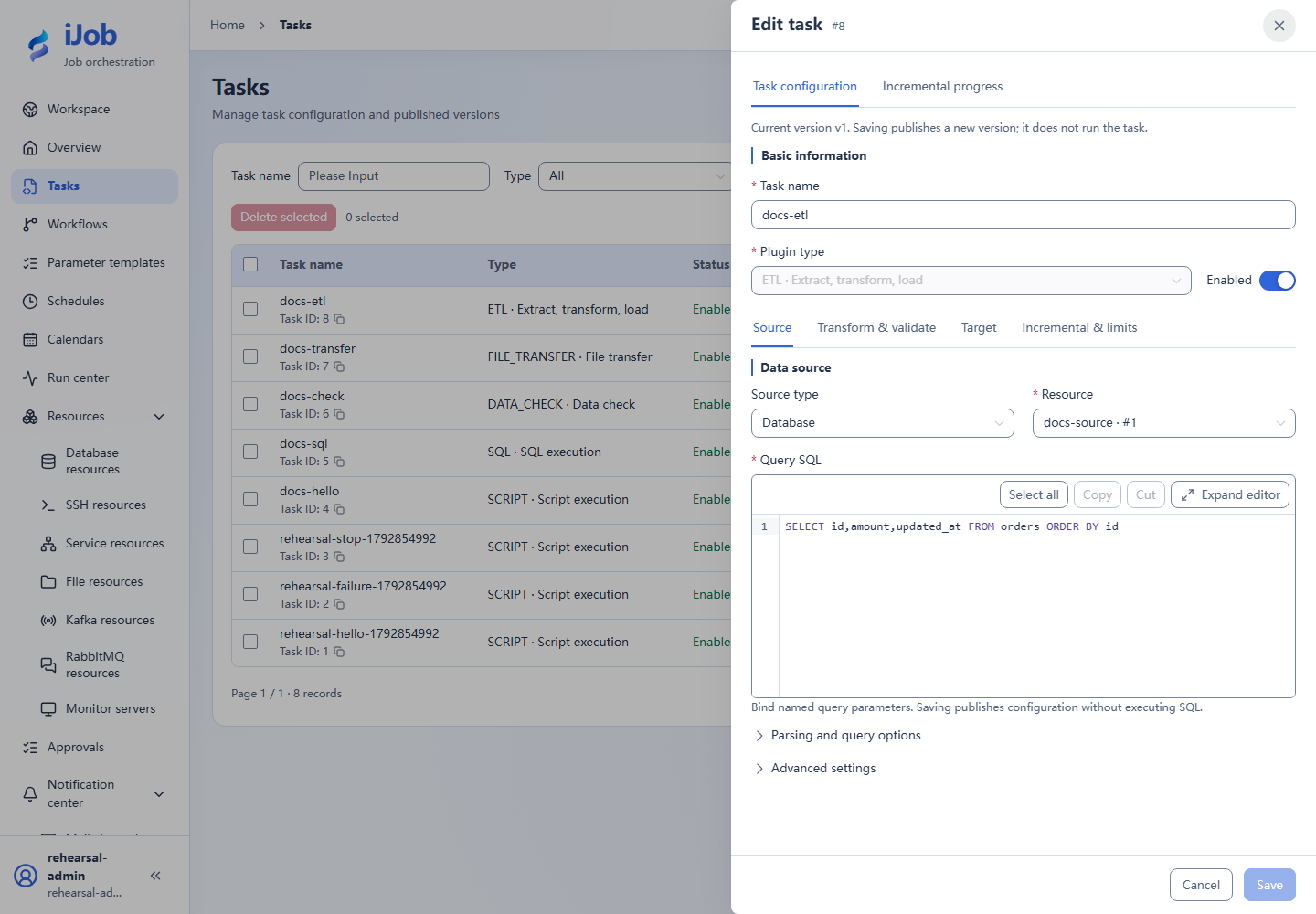
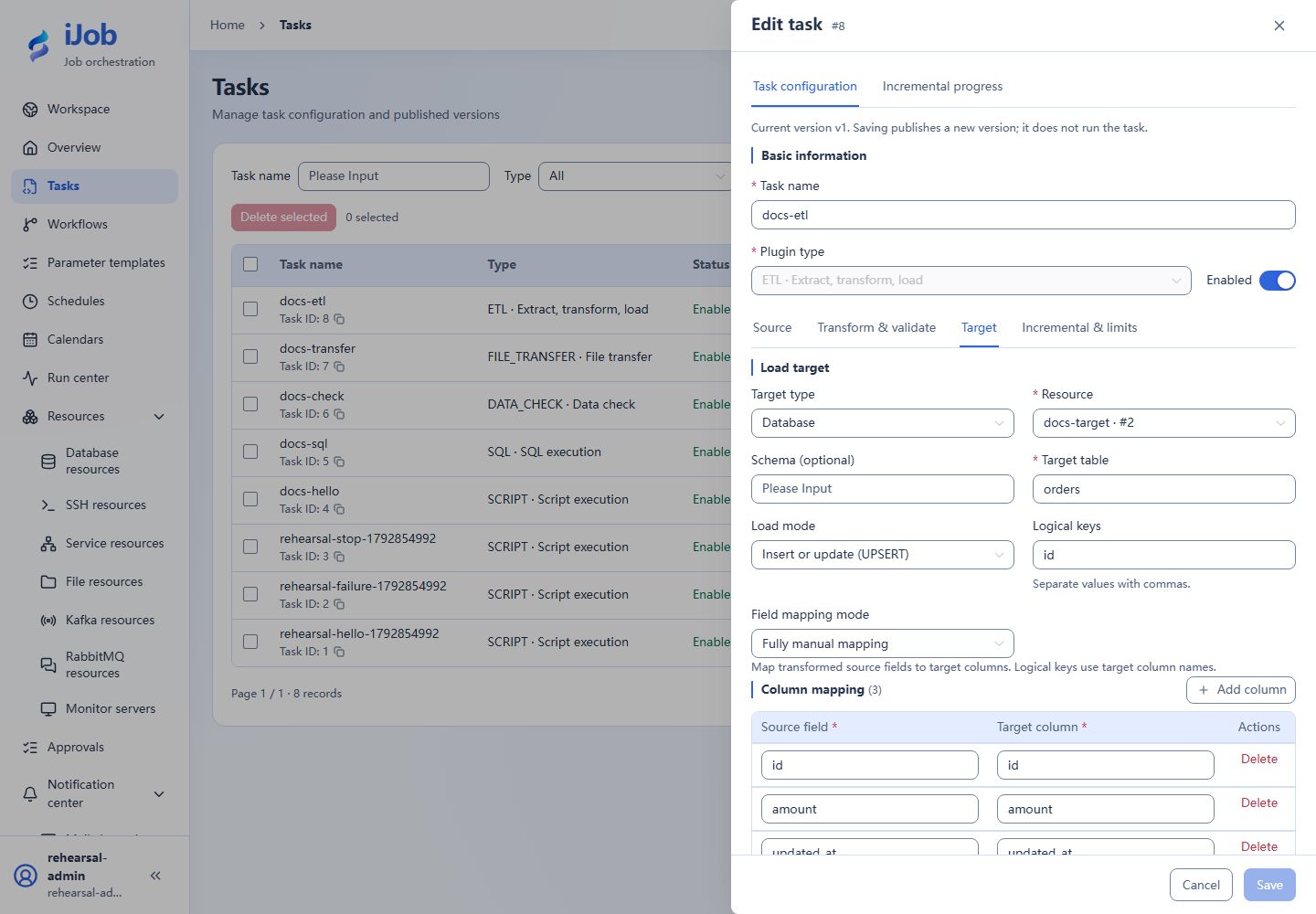
Typical configuration: Upsert three orders into an isolated target
Fill in the form below, replacing resource names with your enabled resources. This is a configuration guide, not importable JSON. Follow the tutorial linked below for data preparation and execution.
Create both database resources first. Source orders contains three rows totaling 600; the target has an empty table with the same structure and an id primary key.
| Setting | Value |
|---|---|
| Source type | DATABASE |
| Source resource | Tutorial source database resource |
| Query SQL | See code below |
| Target type | DATABASE |
| Target resource | Tutorial target database resource |
| Target table | orders |
| Load mode | UPSERT |
| Logical keys | ["id"] |
| Field mapping mode | MANUAL |
| Column mapping | {"id":"id","amount":"amount","updated_at":"updated_at"} |
| Enable incremental extraction | false |
Query SQL:
SELECT id,amount,updated_at FROM orders ORDER BY id
Expected result: The target table has three rows totaling 600; repeating the run does not increase the row count.
Follow the full tutorial. Save the definition before running it; inspect execution state and business results separately.
Actual interface
Configuration keys
Use these keys when inspecting imported configuration, API payloads or errors. [] denotes a collection item; the form does not require you to enter key names.
| Category / field | Configuration key |
|---|---|
| Source / Topic | source.topic |
| Source / Consumer group | source.groupId |
| Source / Queue | source.queue |
| Source / Initial position | source.initialPosition |
| Source / Prefetch (messages) | source.prefetch |
| Source / Source type | source.type |
| Source / Resource | source.resourceId |
| Source / Query SQL | source.sql |
| Source / File path | source.path |
| Source / File format | source.format |
| Source / Read mode | source.readMode |
| Source / Character encoding | source.charset |
| Source / Delimiter | source.delimiter |
| Source / Quote | source.quote |
| Source / Escape | source.escape |
| Source / Header row | source.header |
| Source / Skip lines | source.skipLines |
| Source / Header row index | source.headerRow |
| Source / Start row index | source.startRow |
| Source / Sheet name | source.sheetName |
| Source / Sheet index | source.sheetIndex |
| Source / Regex read mode | source.regexMode |
| Source / Content pattern | source.pattern |
| Source / Block start pattern | source.blockStart |
| Source / Block end pattern | source.blockEnd |
| Source / Max lines per block | source.maxBlockLines |
| Source / Max characters per block | source.maxBlockChars |
| Source / Regex fields (JSON) | source.regexFields |
| Source / Staging table | source.stagingTable |
| Source / Staging columns | source.stagingColumns |
| Source / Multiple sheets (JSON) | source.sheets |
| Source / Fetch size | source.fetchSize |
| Source / Query parameters (JSON) | source.parameters |
| Source / Setup SQL array (JSON) | source.beforeSql |
| Target / Target type | target.type |
| Target / Resource | target.resourceId |
| Target / Schema (optional) | target.schema |
| Target / Target table | target.table |
| Target / Load mode | target.mode |
| Target / Logical keys | target.logicalKeys |
| Target / Field mapping mode | target.mappingMode |
| Target / Excluded source fields (optional) | target.excludedFields |
| Target / Transaction scope | target.transactionScope |
| Target / Null policy | target.nullPolicy |
| Target / Column null policies (JSON) | target.columnNullPolicies |
| Target / Record protection (JSON) | target.protection |
| Target / SCD2 configuration (JSON) | target.scd2 |
| Target / Setup SQL array (JSON) | target.beforeSql |
| Target / Cleanup SQL array (JSON) | target.afterSql |
| Target / File path | target.path |
| Target / Character encoding | target.charset |
| Target / Delimiter | target.delimiter |
| Target / Quote | target.quote |
| Target / Header row | target.header |
| Target / Existing file policy | target.existingFilePolicy |
| Target / Empty output policy | target.emptyFilePolicy |
| Database incremental extraction / Enable incremental extraction | incremental.enabled |
| Database incremental extraction / Checkpoint key | incremental.checkpointKey |
| Database incremental extraction / Marker type | incremental.watermarkType |
| Database incremental extraction / Initial marker | incremental.initialWatermark |
| Database incremental extraction / Marker field | incremental.watermarkField |
| Database incremental extraction / Upper bound SQL | incremental.upperBoundSql |
| Database incremental extraction / Tie breaker fields | incremental.tieBreakerFields |
| Database incremental extraction / Initial tie values (JSON array) | incremental.initialTieBreakerValues |
| Database incremental extraction / Advance past invalid records | incremental.allowCheckpointPastInvalidRecords |
| Incremental file processing / Marker location | incremental.file.markerLocation |
| Incremental file processing / Match mode | incremental.file.matchMode |
| Incremental file processing / Match expression | incremental.file.expression |
| Incremental file processing / Source marker format (optional) | incremental.file.markerFormat |
| Incremental file processing / Parsing time zone | incremental.file.zoneId |
| Incremental file processing / Selection mode | incremental.file.selectionMode |
| Incremental file processing / Lookback window | incremental.file.lookback |
| Incremental file processing / Explicit lower bound | incremental.file.lowerBound |
| Incremental file processing / Upper bound (optional) | incremental.file.upperBound |
| Incremental file processing / Changed completed file policy | incremental.file.changedFilePolicy |
| Incremental file processing / Scan subdirectories | incremental.file.recursive |
| Incremental file processing / Max scan depth | incremental.file.maxDepth |
| Incremental file processing / Max scanned entries | incremental.file.maxScanEntries |
| Incremental file processing / Max files per run | incremental.file.maxFiles |
| Incremental file processing / Total file limit (bytes) | incremental.file.maxTotalBytes |
| Incremental file processing / Stable age (seconds) | incremental.file.stableAgeSeconds |
| Incremental file processing / Ready suffix (optional) | incremental.file.readySuffix |
| Message ingestion / Messages per run | message.maxMessages |
| Message ingestion / Intake window (seconds) | message.intakeSeconds |
| Message ingestion / Idle wait (seconds) | message.idleSeconds |
| Message ingestion / Processing batch size | message.batchSize |
| Message ingestion / Partial batch interval (ms) | message.flushIntervalMillis |
| Message ingestion / Message limit (bytes) | message.maxMessageBytes |
| Message ingestion / Expanded limit (bytes) | message.maxExpandedBytes |
| Message ingestion / Total payload limit (bytes) | message.maxTotalBytes |
| Message ingestion / Receive buffer limit (bytes) | message.maxBufferBytes |
| Message ingestion / JSON depth limit | message.maxJsonDepth |
| Execution limits / Read batch size | execution.readBatchSize |
| Execution limits / Write batch size | execution.writeBatchSize |
| Execution limits / Query timeout (seconds) | execution.queryTimeoutSeconds |
| Execution limits / Max records | execution.maxRecords |
| Execution limits / Single file limit (bytes) | execution.maxFileBytes |
| Execution limits / Max expanded text characters | execution.maxExpandedTextChars |
| Execution limits / Max Excel cells | execution.maxExcelCells |
| Execution limits / Max staging cells | execution.maxStagingCells |
| Execution limits / Max fields per record | execution.maxRecordFields |
| Execution limits / Max characters per field | execution.maxTextFieldChars |
| Execution limits / Max Excel sheets | execution.maxExcelSheets |
| Mapping / Column mapping | target.columns |
| Retries / Allow non-idempotent retries | allowNonIdempotentRetry |
| Transform / Field mapping / Rule parameters (JSON) | transforms[].properties |
| Transform / Default values / Rule parameters (JSON) | transforms[].properties |
| Transform / Trim / Fields | transforms[].properties.fields |
| Transform / Value replacement / Field | transforms[].properties.field |
| Transform / Value replacement / Replacement pairs | transforms[].properties.replace |
| Transform / Date formatting / Field | transforms[].properties.field |
| Transform / Date formatting / Source date format | transforms[].properties.source |
| Transform / Date formatting / Target date format | transforms[].properties.target |
| Transform / Type conversion / Field | transforms[].properties.field |
| Transform / Type conversion / Target data type | transforms[].properties.target |
| Transform / Numeric calculation and precision / Field | transforms[].properties.field |
| Transform / Numeric calculation and precision / Multiply by | transforms[].properties.multiply |
| Transform / Numeric calculation and precision / Divide by | transforms[].properties.divide |
| Transform / Numeric calculation and precision / Add | transforms[].properties.add |
| Transform / Numeric calculation and precision / Decimal places | transforms[].properties.scale |
| Transform / Numeric calculation and precision / Rounding mode | transforms[].properties.roundingMode |
| Transform / Expression / Target column | transforms[].properties.target |
| Transform / Expression / Calculation or condition expression | transforms[].properties.expression |
| Transform / Database lookup / Resource | transforms[].properties.resourceId |
| Transform / Database lookup / Query SQL | transforms[].properties.sql |
| Transform / Database lookup / Query timeout (seconds) | transforms[].properties.queryTimeoutSeconds |
| Transform / Database lookup / Message batch size | transforms[].properties.batchSize |
| Transform / Database lookup / Source lookup field | transforms[].properties.sourceField |
| Transform / Database lookup / Output field | transforms[].properties.targetField |
| Transform / Database lookup / Query key column | transforms[].properties.keyColumn |
| Transform / Database lookup / Query value column | transforms[].properties.valueColumn |
| Transform / Deduplication / Fields | transforms[].properties.fields |
| Transform / Deduplication / Maximum distinct keys | transforms[].properties.maxKeys |
| Transform / Deduplication / Keep policy | transforms[].properties.keep |
| Validation / Required fields / Fields | validations[].properties.fields |
| Validation / Regular expression / Field | validations[].properties.field |
| Validation / Regular expression / Content pattern | validations[].properties.pattern |
| Validation / Range / Field | validations[].properties.field |
| Validation / Range / Minimum (inclusive) | validations[].properties.min |
| Validation / Range / Maximum (inclusive) | validations[].properties.max |
| Validation / Enumeration / Field | validations[].properties.field |
| Validation / Enumeration / Allowed values | validations[].properties.values |
| Validation / Condition / Calculation or condition expression | validations[].properties.expression |
| Validation / SQL / Resource | validations[].properties.resourceId |
| Validation / SQL / Query SQL | validations[].properties.sql |
| Validation / SQL / Query timeout (seconds) | validations[].properties.queryTimeoutSeconds |
| Validation / SQL / Message batch size | validations[].properties.batchSize |
| Validation / SQL / Validation scope | validations[].properties.mode |
| Validation / SQL / Field | validations[].properties.field |
| Validation / Foreign-key existence / Resource | validations[].properties.resourceId |
| Validation / Foreign-key existence / Query SQL | validations[].properties.sql |
| Validation / Foreign-key existence / Query timeout (seconds) | validations[].properties.queryTimeoutSeconds |
| Validation / Foreign-key existence / Message batch size | validations[].properties.batchSize |
| Validation / Foreign-key existence / Field | validations[].properties.field |
| Advanced target / protection / Protected column | target.protection.column |
| Advanced target / protection / Protected values | target.protection.protectedValues |
| Advanced target / protection / Protected record policy | target.protection.onProtected |
| Advanced target / SCD2 / Business keys (target columns) | target.scd2.businessKeys |
| Advanced target / SCD2 / Comparison columns | target.scd2.compareFields |
| Advanced target / SCD2 / Effective time source field | target.scd2.effectiveValueField |
| Advanced target / SCD2 / Valid from column | target.scd2.validFromColumn |
| Advanced target / SCD2 / Valid to column | target.scd2.validToColumn |
| Advanced target / SCD2 / Current version column | target.scd2.currentFlagColumn |
| Advanced target / SCD2 / Current version value | target.scd2.currentValue |
| Advanced target / SCD2 / History version value | target.scd2.historyValue |
| Advanced target / SCD2 / Time granularity | target.scd2.granularity |
Related pages
Tasks and versions · Parameters and expressions · Scenario tutorials