Schedules, preview and catch-up
Entry and workflow
Schedules → New schedule. ADMIN can create, edit and delete configuration. OPERATOR and VIEWER can read summaries but cannot modify configuration. See the role matrix for all actions.
Configuration and actions
Schedule fields
| Field | Required | Initial form value | Shown when | Description |
|---|---|---|---|---|
| Target type | Required | Task | Always | Choose a task or job. |
| Target | Required | Empty | Always | Search for a published object; admission uses its current published version. |
| Schedule type | Required | CRON | Always | Choose CRON, Interval or Once. |
| CRON expression | Required | Empty | Schedule type is CRON | Six fields: second, minute, hour, day, month and weekday; validated by the server. |
| Interval (seconds) | Required | Empty | Schedule type is Interval | Seconds between candidate triggers. |
| Execution time | Required | Empty | Schedule type is Once | Enter a complete valid time in the business timezone. |
| Start time (optional) | Optional | Empty | CRON or Interval | Set the earliest allowed candidate time. |
| End time (optional) | Optional | Empty | Always | Must not precede the start; combines with the calendar to filter candidates. |
| Calendar (optional) | Optional | None | Always | Filter using saved weekday rules and exception dates. |
| Select template | Optional | Empty when no template is bound | Parameter form | Load parameter definitions and defaults. The schedule saves these values and does not follow later template edits. |
| Input variables (JSON object) | Optional | {}; a default template loads its values | When using advanced JSON input | Up to 100 variables and 65536 bytes total; names cannot start with ijob. |
| Misfire policy | Optional | Use backend default | Advanced policies | Skip, fire latest once or bounded catch-up. Explicit overrides are independent of backend defaults. |
| Grace period (seconds) | Optional | Use backend default | Advanced policies | Apply misfire policy after this grace period; the backend supplies allowed bounds. |
| Catch-up limit | Optional | Use backend default | Advanced policies | Bound the catch-up count; the backend catch-up window also applies. |
| Queue deadline (seconds) | Optional | Empty | Advanced policies | Empty means no deadline. Measured from planned fire time, not task execution start. |
| Enabled | Initialized | Off | Always | An enabled saved schedule participates in automatic scheduling. |
Page information
| Display | Meaning | Shown when |
|---|---|---|
| Business timezone | Provided by the backend; changing the header display timezone does not change it. | Always |
Actions
| Action | Roles | Available when | Result |
|---|---|---|---|
| Preview | ADMIN | Business timezone is loaded; rules and parameters are valid | Calculate candidates without saving or executing. Preview again after changing conditions. |
| Save | ADMIN | Complete configuration is loaded and required fields/ranges validate | Save the schedule and current parameter snapshot; an enabled schedule may trigger according to its rule. |
| Enable | ADMIN | Valid saved schedule and available target | Allow subsequent automatic scheduling; this does not mean a run has already succeeded. |
Use and verify
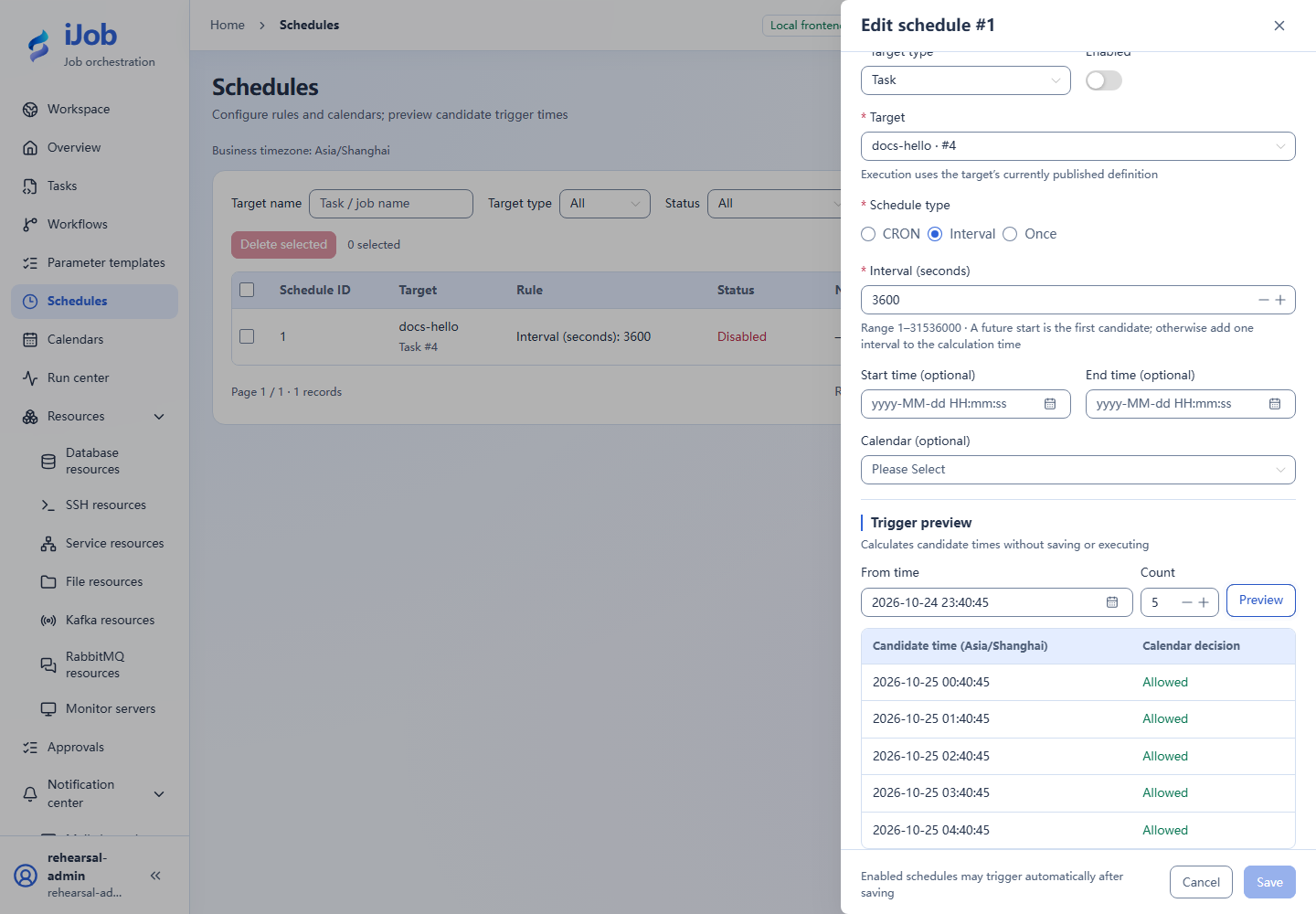
Start with docs-hello, INTERVAL=3600 and disabled state. Preview five candidates and check zone/calendar. Enable only in a controlled window to verify trigger→instance→result, then disable. If no candidates appear, inspect bounds/calendar before shortening the interval.
Real page examples
Five candidates for a disabled schedule; preview only, automatic running remains off.